CoverRescue
Structured AI tools for creative decision-making
Project Snapshot
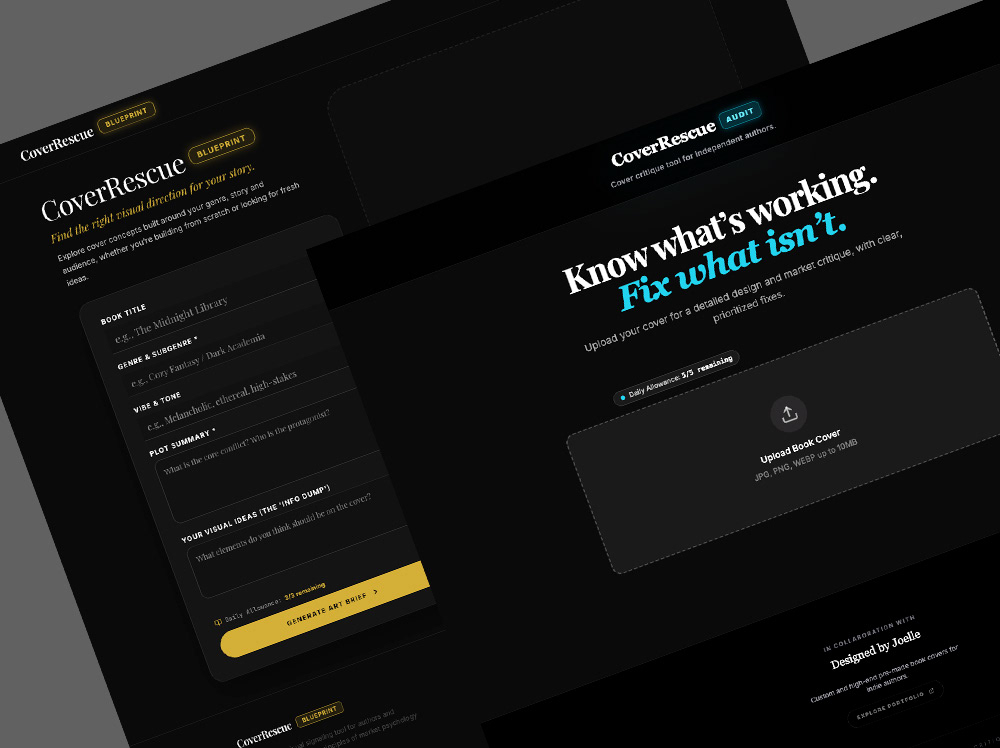
Upload an existing cover for a prioritized audit, or enter the book details to develop a clear visual direction before designing.
CoverRescue is a pair of AI-assisted web apps for independent authors and cover designers:
CoverRescue: Audit evaluates an existing cover and identifies the changes most likely to improve it.
CoverRescue: Blueprint turns a book’s story, audience, and market position into a visual strategy and three distinct cover concepts.
My role: Product concept, UX, visual design, evaluation framework, prompt development, prototyping and testing
Built with: Google AI Studio
Status: Working prototypes
The Problem
Book-cover feedback is often subjective and difficult to act on. An author may know that a cover feels wrong without knowing whether the problem is genre signalling, typography, composition, thumbnail readability, or the concept itself.
The same problem appears earlier in the process. A designer can begin generating images before deciding what the cover needs to communicate, leading to scattered ideas and repeated revisions.
I wanted to turn my cover-design process into a more structured system: one that helps users diagnose an existing cover or establish a stronger direction before production begins.
Defining the Product
I separated the workflow into two apps because the user may arrive with two very different problems.
CoverRescue: Audit
The Audit is for users who already have a cover.
The user uploads the artwork and provides basic information about the book, genre, and intended audience. The app evaluates genre signalling, typography, hierarchy, composition, thumbnail performance, visual integrity, and market alignment.
The report identifies what is working, flags the most consequential problems, and organizes recommended changes by priority.
CoverRescue: Blueprint
The Blueprint is for users who need a visual direction.
The user provides information about the story, tone, genre, audience, and comparable titles. The app turns those inputs into a defined cover strategy, including composition, palette, typography, imagery, elements to avoid, and three concept directions.
Each direction includes an art brief and an image-generation prompt that follows the strategy established earlier in the report.
Structuring the AI
Both apps use guided inputs and predefined report structures instead of an open-ended chat.
I defined what information the system needed, how each factor should be evaluated, and how the response should move from broad analysis to specific action. This reduced vague advice and made the output easier to scan, compare, and use.
For the Audit, recommendations are organized by severity so small refinements do not receive the same weight as problems that could affect genre recognition or thumbnail performance.
For the Blueprint, the system establishes the market and visual strategy before generating concepts. This keeps the final ideas connected to the book rather than producing a collection of unrelated image prompts.
Designing Around the User
The interface guides users through a specialist process without requiring them to understand design terminology or prompt construction.
Several decisions shaped the workflow:
Evaluate covers at retail thumbnail size, where most readers first encounter them.
Separate strengths from problems so useful parts of an existing design are not discarded automatically.
Prioritize recommendations by likely impact.
Generate multiple concept directions from one strategy rather than minor variations of the same idea.
Keep the reasoning visible so users can judge whether a recommendation fits their book.
The goal was to provide enough structure to support a decision while leaving the final creative judgment with the user.
Using AI to Build It
I built the prototypes in Google AI Studio. AI generated the code while I directed and refined the product structure, interface, logic, prompts, and output requirements.
This allowed me to move from an idea to working software without treating the generated result as finished by default. I tested the apps repeatedly with sample covers, reviewed the quality and consistency of the reports, and adjusted the instructions and workflow where the output became vague, repetitive, or poorly prioritized.
What Shipped
The current prototypes include:
• A guided intake process for each use case
• Image upload and cover-analysis functionality
• Structured, section-based reports
• Severity and priority indicators
• Thumbnail and market-fit evaluation
• Three differentiated cover concepts
• Detailed art direction and image-generation prompts
• Downloadable reports for later reference
The Result
CoverRescue turns a specialist creative process into two repeatable workflows: diagnose the cover that already exists or define the cover that needs to be made.
The prototypes show how creative standards, user inputs, AI analysis, and interface design can work together to produce more consistent and usable output. The same system-design approach applies to other creative production work where quality depends on gathering the right information, controlling variability, and turning analysis into clear next steps.